C
Qt Quick Ultralite 翻译示例
演示如何在 Qt Quick Ultralite 应用程序中实现翻译。
概述
translation 示例使用了在 Qt Quick Ultralite 的国际化与本地化 主题中描述的技术。展示了如何将本地化资源嵌入到您的应用程序中,以及如何使用现有的 QML API 在运行时更改 UI 语言。
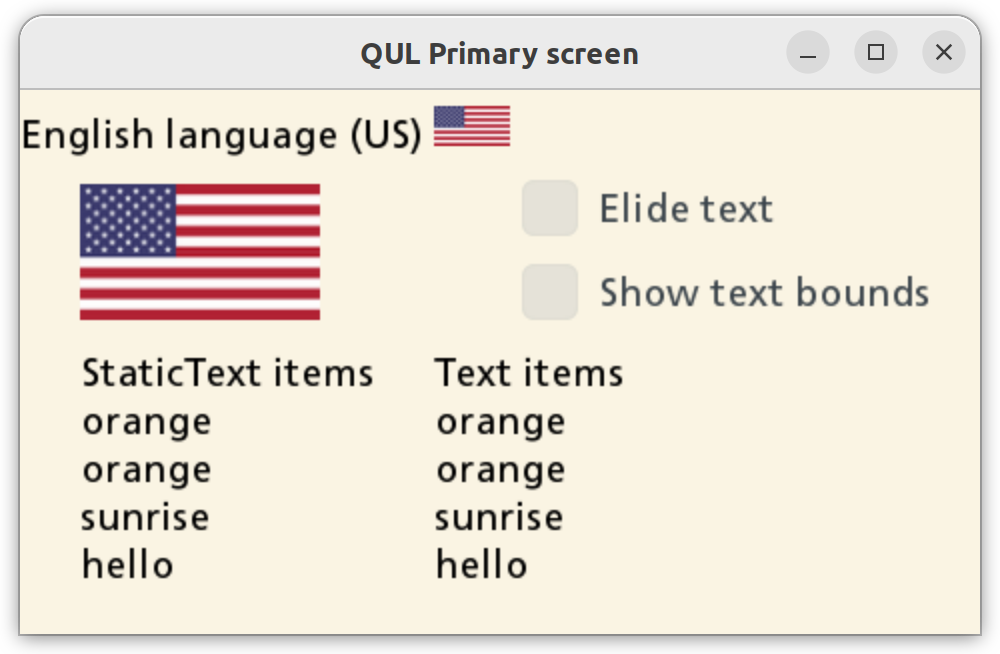
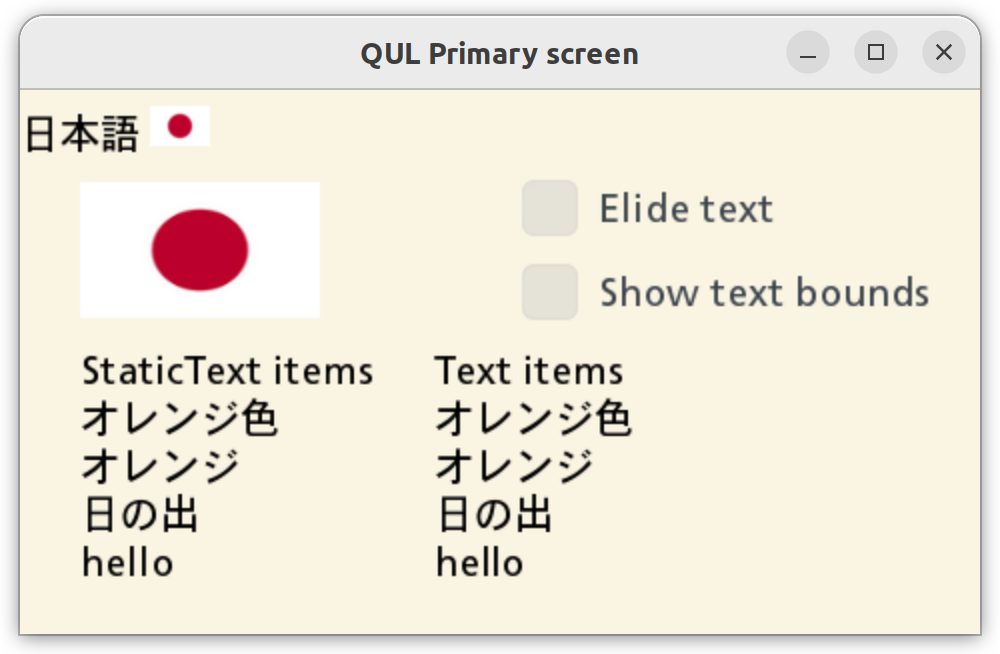
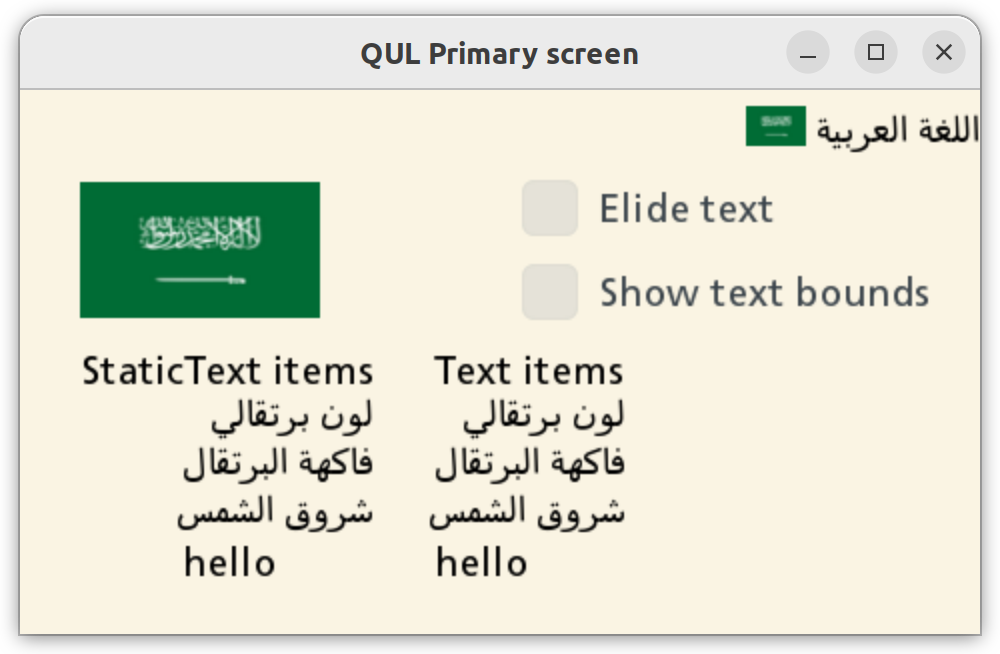
通过触摸屏幕,用户可以在可用的语言(英语、挪威语、拉脱维亚语、日语、阿拉伯语、泰语)之间切换。更改应用程序语言会更新国旗图片,以及 Text 和 StaticText 项目。只有 StaticText 项能正确地使用静态字体引擎渲染复杂的脚本。
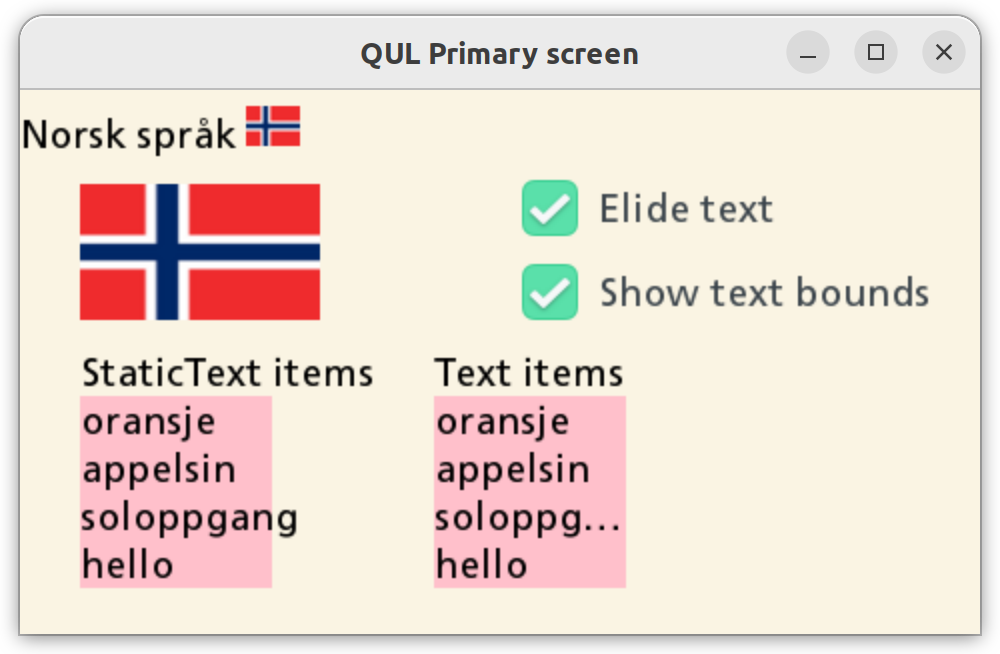
应用程序提供了以下选项
- 删除文本 - 只删除 Text 项目中的文本。此选项不影响 StaticText 项,因为不支持在其中删除文本。
- 显示文本背景 - 向文本项添加粉红色背景,以可视化文本将被删除的边界。
目标平台
项目结构
CMake 项目文件
此示例的 CMakeLists.txt 定义了三个独立的 CMake 目标
translation_all- 使用所有翻译来构建应用程序。translation_lv- 仅使用拉脱维亚语翻译来构建应用程序。translation_spark- 使用所有翻译和 Monotype Spark 字体引擎 来构建应用程序。
QmlProject 文件
由于应用程序使用的是 Qt Quick Ultralite 默认字体中未包含的符号渲染文本,因此每个目标中都添加了自定义字体。
    // Qul ships some default fonts. Since they don't contain glyphs for
    // all the characters that are needed for this application,
    // add some extra fonts.
    FontFiles {
        files: [
            "fonts/kosugi/Kosugi-Regular.ttf",
            "fonts/sarabun/Sarabun-Regular.ttf"
        ]
    }
translation_all
此应用程序变体包含所有可用的翻译。
    TranslationFiles {
        files: [
            "translation.ar_SA.ts",
            "translation.ja_JP.ts",
            "translation.lv_LV.ts",
            "translation.nb_NO.ts",
            "translation.th_TH.ts"
        ]
    }

    // Qul ships some default fonts. Since they don't contain glyphs for
translation.lv
在此,只有拉脱维亚语可用,并设置为默认应用程序语言。
    TranslationFiles {
        files: ["translation.lv_LV.ts"]
        MCU.omitSourceLanguage: true
    }
translation_spark
此应用程序变体基本上与translation_all相同,只是它使用Monotype Spark字体渲染引擎。
...
        TranslationFiles {
                files: [
                "translation.ar_SA.ts",
                "translation.ja_JP.ts",
                "translation.lv_LV.ts",
                "translation.nb_NO.ts",
                "translation.th_TH.ts"
                ]
        }

        FontFiles {
                files: [
                        "fonts/monotype/TranslationsSampleFontmap.fmp"
                ]
        }

        MCU.Config {
                fontEngine: "Spark"
                defaultFontFamily: "arabic-style-font"
                fontCacheSize: 1 // Disable the cache
        }
...
应用程序UI
文件translation.qml定义了应用程序的用户界面。
要标记可本地化的字符串,请使用qStr()方法。
StaticText {
    width: root.textMaxWidth
    text: qsTr("orange", "color")
}
StaticText {
    width: root.textMaxWidth
    text: qsTr("orange", "fruit")
}
StaticText {
    width: root.textMaxWidth
    text: qsTr("sunrise")
}
StaticText {
    // This string is not translated in the .ts files and
    // will just fall back to the source string.
    width: root.textMaxWidth
    text: qsTr("hello")
}
在处理翻译时,Qt.uiLanguage属性是关注的中心点。
如果仅使用一种可用语言构建应用程序,则Qt.uiLanguage属性将为空。
// Disable language switching when this is compiled with
// a single language.
Component.onCompleted: allowLangSwitch = (Qt.uiLanguage == "")
更改Qt.uiLanguage属性的值以更改当前的UI显示语言。
MouseArea {
    anchors.fill: parent
    onClicked: {
        if (!root.allowLangSwitch)
            return

        var lang = Qt.uiLanguage
        switch (lang) {
            case "nb_NO": lang = "lv_LV"; break;
            case "lv_LV": lang = "ja_JP"; break;
            case "ja_JP": lang = "ar_SA"; break;
            case "ar_SA": lang = "th_TH"; break;
            case "th_TH": lang = ""; break;
            default: lang = "nb_NO"; break;
        }
        Qt.uiLanguage = lang
    }
}
注意:设置空字符串表示使用“默认”语言(卸载.ts文件),其中使用qStr()包装的原始文本。
翻译特定图像
Text.StyledText格式化的字符串在qsTr()中受支持。此方法为翻译者提供了灵活性,可以根据翻译字符串中的词序更改文本中图像的位置。
StaticText {
    width: root.width
    topPadding: 8
    textFormat: Text.StyledText
    text: qsTr("English language (US) <img src=\"usa-flag-small-icon.png\" width=\"38\" height=\"20\">")
}
或者,可以使用Image项目,并且source属性可以绑定到Qt.uiLanguage。
Image {
    readonly property bool horizontalScreen: root.width > root.height
    width: horizontalScreen ? root.width / 4 : root.width / 3
    height: horizontalScreen ? root.height / 4 : root.height / 8
    // If this application is build with, for example, only one translation
    // (see translation_lv.qmlproject), then only one of flag PNGs
    // is needed in the binary (registered with the resouce system).
    // By using a function here we prevent qmltocpp from trying to
    // resolve file paths to images at build-time. Instead
    // a code is generated that will try to resolve the path to
    // image at run-time.
    source: flagForLanguage()
}
翻译文件(.ts)
在首次构建应用程序时,.ts文件将生成到您的项目根目录。
翻译文件是一个纯XML文件。
<?xml version="1.0" encoding="utf-8"?>
<!DOCTYPE TS>
<TS version="2.1" language="nb_NO">
<context>
<name>translation</name>
<message>
<location filename="translation.qml" line="108"/>
<source>English language (US) <img src="usa-flag-small-icon.png" width="38" height="20"></source>
<oldsource>English language (US) <img src="usa-flag-small-icon.png"> width="38" height="20"</oldsource>
<translation>Norsk språk <img src="norway-flag-small-icon.png" width="27" height="20"></translation>
</message>
...您可以使用任何文本/xml编辑器为<translation>节点提供正确的值。Qt Linguist GUI编辑器也是一个 perfect choice来处理翻译文件。
启动自动生成的update_translations CMake目标构建,以使用源代码中的新字符串和更改过的可翻译字符串创建或更新.ts文件。
修改.ts文件后,重新构建您的应用程序以更新翻译。
如果在翻译文件中找不到用qStr()包裹的字符串,则将使用原始(源)字符串。
文件
- translation/CMakeLists.txt
- translation/imports/fontconfigs/spark/FontConfiguration.qml
- translation/imports/fontconfigs/static/FontConfiguration.qml
- translation/translation.ar_SA.ts
- translation/translation.ja_JP.ts
- translation/translation.lv_LV.ts
- translation/translation.nb_NO.ts
- translation/translation.qml
- translation/translation.th_TH.ts
- translation/translation_all.qmlproject
- translation/translation_fontconfig_spark.qmlproject
- translation/translation_fontconfig_static.qmlproject
- translation/translation_lv.qmlproject
- translation/translation_spark.qmlproject
- translation/translation_spark_ek-ra6m3g.qmlproject
图像
- translation/japan-flag-small-icon.png
- translation/japan-flag-small.png
- translation/latvia-flag-small-icon.png
- translation/latvia-flag-small.png
- translation/norway-flag-small-icon.png
- translation/norway-flag-small.png
- translation/saudi-arabia-flag-small-icon.png
- translation/saudi-arabia-flag-small.png
- translation/thai-flag-small-icon.png
- translation/thai-flag-small.png
- translation/usa-flag-small-icon.png
- translation/usa-flag-small.png
另请参阅使用Qt Quick Ultralite进行国际化和本地化。
适用于某些Qt许可证。
了解更多。