
C
Qt Quick Ultralite 绘制项目示例
演示了在 Qt Quick Ultralite 应用程序中使用 PaintedItem。
概述
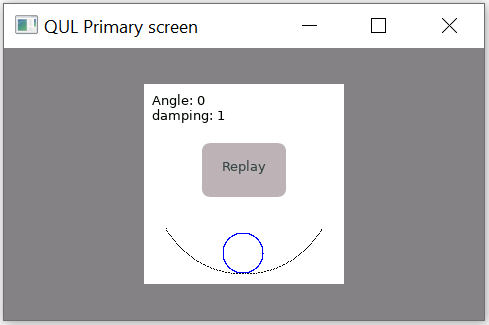
该 painteditem 示例使用 PaintedItem Qml 类型直接在帧缓冲区上绘图。它显示了一个动画,模拟在曲线斜坡上圆形滴状物体的振荡运动。
该示例使用 OscillatorPaintedItem 类,它覆盖了 paint() 方法来绘制曲线斜坡和圆形滴状物体。每当角度属性更新时(每 100ms 更新一次),都会调用 paint() 方法。
目标平台
项目结构
该 painteditem 示例包含以下文件
CMakeLists.txtmcu_painteditem.qmlprojectoscillator.qmlmain_baremetal.cpposcPaintedItem.cpposcPaintedItem.h
CMake 项目文件包含一个基本的构建脚本,oscillator.qml 定义了应用程序的 UI,而项目配置定义在 mcu_painteditem.qmlproject 中。
main_baremetal.cpp 包含设置裸机平台应用程序的 main 函数。
oscPaintedItem.h 和 oscPaintedItem.cpp 文件包含 OscillatorPaintedItem 类的定义,该类从 PaintedItemDelegate 类派生。
CMake 项目文件
cmake_minimum_required (VERSION 3.21.1)

project(painteditem VERSION 0.0.1 LANGUAGES C CXX ASM)
if (NOT TARGET Qul::Core)
    find_package(Qul)
endif()

string(TOLOWER ${QUL_PLATFORM} PLATFORM_LOWERCASE)

set (GENERATE_ENTRYPOINT_ARG "")
if (QUL_OS STREQUAL "FreeRTOS")
    set(GENERATE_ENTRYPOINT_ARG GENERATE_ENTRYPOINT)
endif()

qul_add_target(painteditem QML_PROJECT mcu_painteditem.qmlproject oscPaintedItem.cpp ${GENERATE_ENTRYPOINT_ARG})

if (PLATFORM_LOWERCASE MATCHES "^rh850" OR PLATFORM_LOWERCASE MATCHES "^tvii")
    target_compile_definitions(painteditem PRIVATE NO_TOUCH)
endif()

app_target_setup_os(painteditem)

if (NOT QUL_OS STREQUAL "FreeRTOS")
    target_sources(painteditem PRIVATE
                   main_baremetal.cpp
    )
endif()
QmlProject 文件
import QmlProject 1.3

Project {
        mainFile: "oscillator.qml"

        InterfaceFiles {
                files: [
                        "oscPaintedItem.h"
                ]
        }

        ModuleFiles {
                MCU.qulModules: ["Controls"]
        }
}
PaintedItem
PaintedItem Qml 类型的 delegate_ 属性指向 OscillatorPaintedItem 实例。
                    //PaintedItem Object
                    PaintedItem {
                        id: oscillator
                        anchors.right: parent.right
                        anchors.top: parent.top
                        anchors.fill: parent

                        delegate_: OscillatorPaintedItem {
                            id: delegate
                            angle: 0.0
                            initialAngle: 50
                            pivotLength: 50

                            onAngleChanged: {
                                delegate.update()
                            }
                        }
                    }
文本项
显示初始角度和固定阻尼系数的振荡在左上角。
                    Text {
                        anchors.top: parent.top
                        anchors.topMargin: 8
                        anchors.left: parent.left
                        anchors.leftMargin: 8
                        text: "Angle: " + delegate.initialAngle + "\ndamping: " + app.dampingFactor
                        font.pixelSize: 13
                    }
重播按钮
当振荡角度达到 0 时,圆形滴状物体处于静止状态。按下 重播 按钮,通过将初始角度设置回最大值来重新启动动画。
                    Button {
                        id: replay

                        //For platforms not supporting touch input, hide Replay button.
                        visible: !root.automaticAnimation

                        anchors.horizontalCenter: parent.horizontalCenter
                        anchors.bottom: parent.verticalCenter
                        height: 40
                        width: 70
                        font.pixelSize: 13
                        text: "Replay"

                        background: Rectangle {
                            color: replay.down ? "#A39D9C" : "#B8B3B2"
                            radius: 8
                        }

                        onClicked: {
                          /*Setting the initialAngle property to maximum value disturbs the equilibrium and
                          triggers the animation again.*/
                          delegate.initialAngle = 50
                        }
动画计时器
动画关注角度属性,该属性每 100ms 更新一次。每次对角度属性的更新都会触发代理更新,从而调用 OscillatorPaintedItem 的 paint() 方法。
                    Timer {
                        running: root.automaticAnimation
                        repeat: true
                        interval: 8000
                        onTriggered: delegate.initialAngle = 50
                    }
文件
在某些Qt许可证下可用。
了解更多。
